-->

W E L C O M E

Related Posts Plugin for WordPress, Blogger...

Showing posts with label Mobile. Show all posts

Saturday, 6 December 2014

Home Made USB Lamp

Self Made Small USB Lamp Out of old wasted zero bulb......
Working in awesome condition.... 
can be used @ night to provide light on your keyboard.


Saturday, 26 April 2014

Test Your USB Drive for Bad Sectors

Check Flash (ChkFlsh) is a very simple flash drive testing and maintaining tool. I have used this tool several times to run a burn in read and write test on USB drives. If the device is able to survive after a few cycles, the USB flash drive should be OK. There are 3 access types and 6 action types for you to select. To access the actions of “Read stability test”, “Save image”, “Load image” and “Full erase” you have to change the Access type from temporary file to a logical or physical drive.

DOWNLOAD  CHECK FLASH

Check Flash drive
Other than checking for drive errors, it can also determine the read and write speed. The test length can be set to scan the drive just once, several specified passes, or leave it running until an error is found, or you tell it to stop. Check Flash is a free and single portable executable file. It can only test USB flash drive and not external hard drives.

Wednesday, 9 April 2014

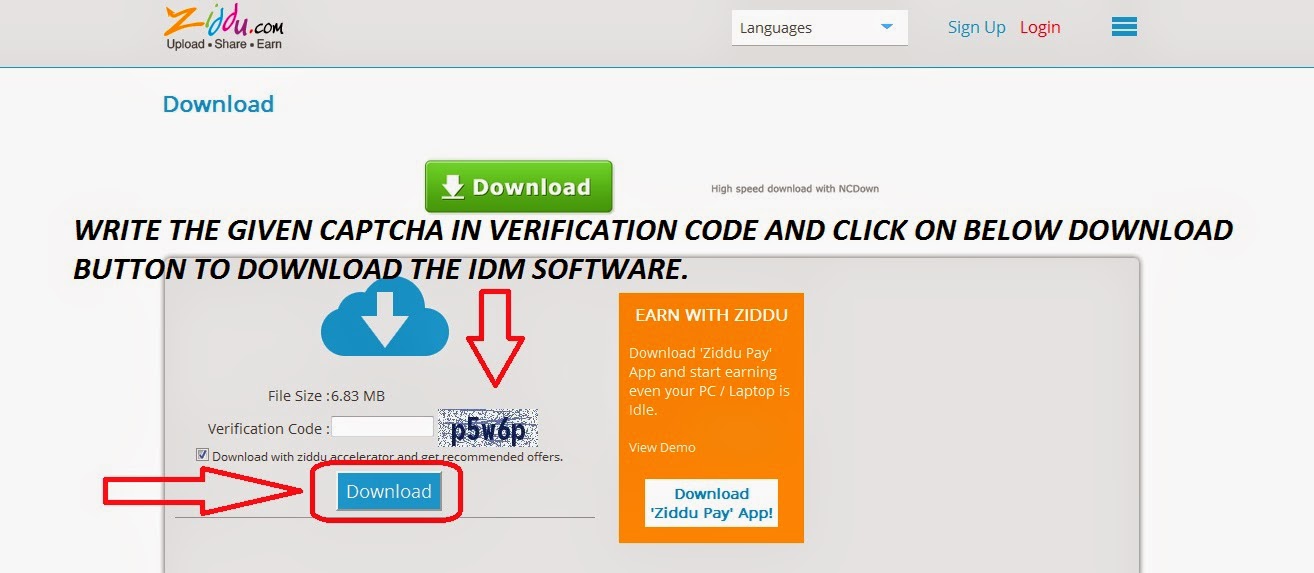
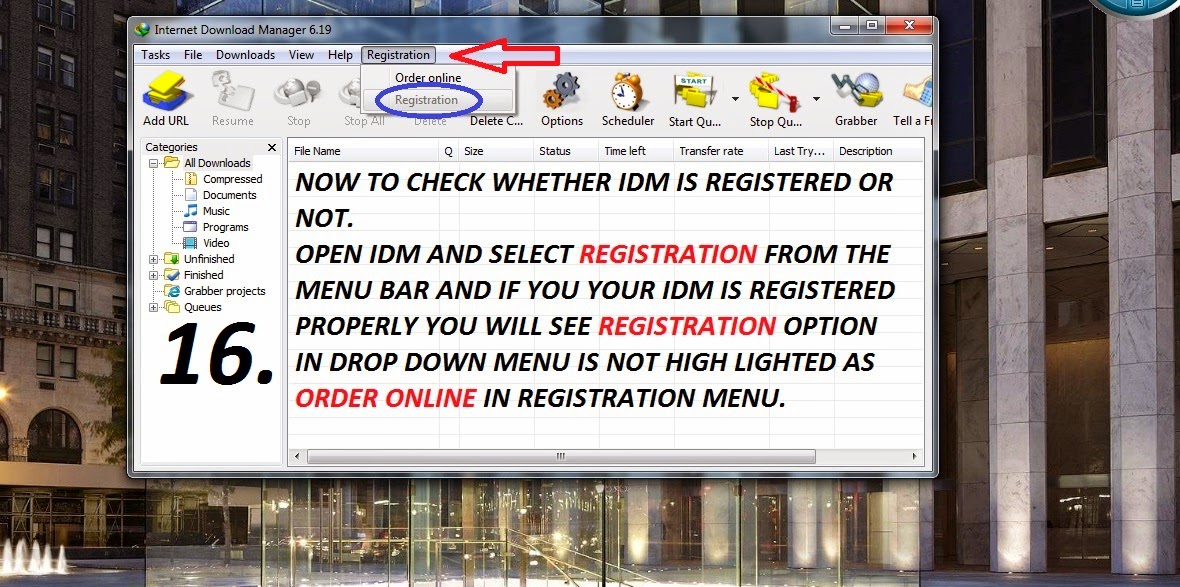
DOWNLOAD AND INSTALL LATEST IDM WITH SCREEN SHOTS


DOWNLOAD  LATEST IDM FROM ABOVE

DOWNLOAD IDM AND EXTRACT USING WINRAR AND FOLLOW THE STEPS GIVEN BELOW.


Wednesday, 26 February 2014

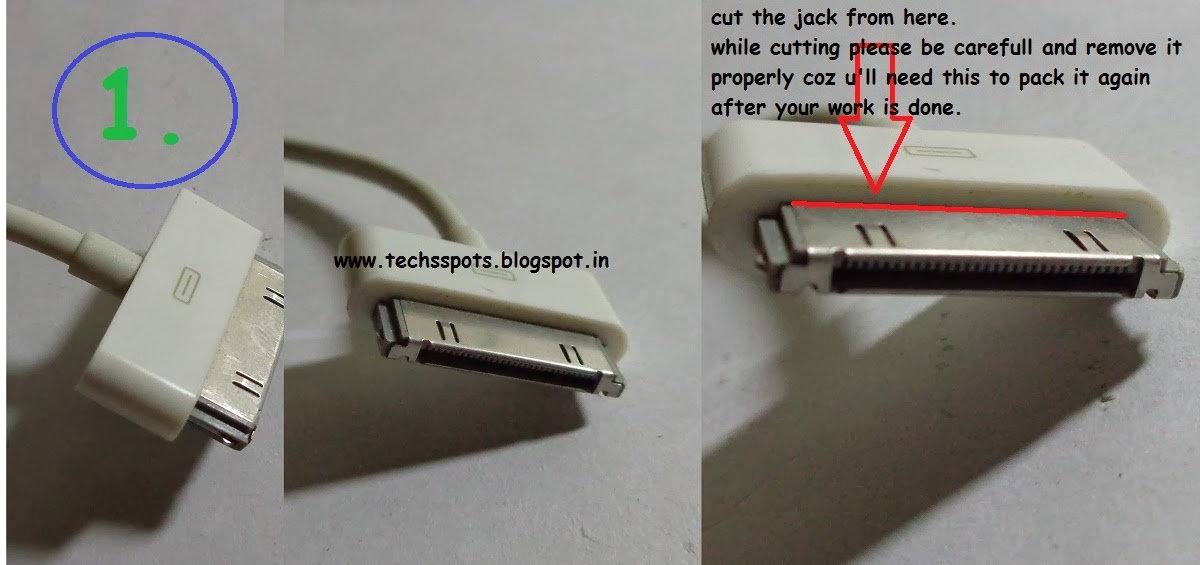
how to repair your 30pin iphone/ipod/ipad and other apple products data cable.

This post will teach you how to repair your 30pin iphone/ipod/ipad and other apple products data cable.

My data cable was working fine but one fine day i dont know what happen it suddenly stopped working. i thought of getting the new one but it was too costly.

So then i thought of repairing my data cable.

Note :  this post will help you only if your data cable is disconnected from the 30 pin connector side and not the usb connector side. If your data cable is disconnected by the usb side then please write to us we will show you the way how connect it.

SO NOW LET US START.

THINGS U NEED
1. SOLDER WIRE.
2. SOLDERING IRON.
3. WIRE STRIPPER FOR WIRES.
4. CUTTER.


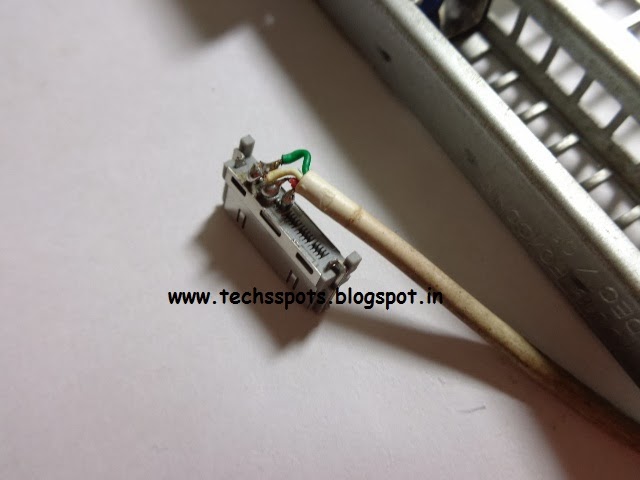
3. STRIP THE WIRES FOR SOLDERING IT ON THE PINS.
PLEASE SEE THE BELOW IMAGE FOR MORE UNDERSTANDING OF THE CONNECTION AND SOLDERING METHOD.


 hope you understand with post and i helped you.
please write us if you have any trouble while doing this.

Wednesday, 2 October 2013

Nano-SIM cards: What you need to know


With the Nexus 5 shifting to Nano-SIM, in all probability, this could pretty much be the standard for future Android flagship smartphones. This is what you should know of the new standard and how you can convert your card to a Nano-SIM.

Nano-SIM cards: What you need to know


Apple shifted to the Nano-SIM standard with the iPhone 5, and the two newer ones - the iPhone 5s and the iPhone 5c, are following the same standard. Android phones till now, had remained on the micro-SIM standard, irrespective of the brand, the device or the price band it played in. Except for the Moto X, but that hasn’t made a splash in India, as yet. But, with the Nexus 5 apparently shifting to the even smaller SIM card standard, surely the next line of Android flagships (and beyond), will also make the shift.
Unless you are using an iPhone 5 or beyond, and suddenly decide to shift to the Nexus 5, you will probably not be prepared, in the true sense of the word. There are basically two possibilities in play here - either you have the Mini-SIM (the SIM card as we have known till recently) or the smaller micro-SIM, that most phones use these days. We tell you how to get your SIM card ready for the Nano-SIM standard.
What is the Nano-SIM?
The current Nano-SIM cards that we are using in the newer iPhones and now with the Moto X as well, are also known as the Fourth Form Factor (4FF). This SIM measures a mere 12.3 mm x 8.8 mm x 0.67 mm, which is 15% thinner than the micro-SIM cards that most Android, Windows Phone and BlackBerry 10 phones deploy, with dimensions at 15mm x 12mm x 0.76mm.
The basic idea behind the even smaller SIM card standard is that the Nano SIM (4FF) reduces the size of the SIM effectively to just the golden coloured contact area. The area around the contact area is just about enough to prevent any electrical shorts that may occur within the socket. Essentially, the socket (also known as SIM-card slot) design remains the same, only that it is now smaller in dimension because the area around the contact area is greatly reduced.
Why the shift to the even smaller SIM standard?
Albeit belatedly, Android phones are also moving to this standard, because this allows smartphone makers those critical extra millimeters to play around with, with the immediate demands of a faster processor, the cooling need that comes with it as well as the bigger batteries to make the phone last longer than they do these days, on a single charge. There is no performance or cost advantage, but just the technological and internal design aspects.
Graphic: Full-size SIM (1FF), mini-SIM (2FF), micro-SIM (3FF) and nano-SIM (4FF) (images are to scale)
This is confusing!
The regular SIM, the micro-SIM and a Nano-SIM, this is all becoming a little too much to manage. The confusion is one thing, but the lack of flexibility is a major problem. If you have one phone which uses a micro-SIM, and one of the iPhones with the Nano-SIM, the two SIMs cannot be swapped. And while it is manageable most of the time, can become a headache if you want to change phones, which trust me, a lot of us do!
Is your SIM card ready?
Well, it isn’t as simple as “I have a SIM card and can I convert this to a Nano-SIM”. Certain things you need to keep in mind.
Getting Nano-Ready: How to get the SIM down to size
There are micro-SIM and Nano-SIM cutters available in stores, which will chop down the regular SIM into the new size. Both cutters are separate, and should not be confused. Buy the cutter, and carefully follow the instructions on the box, and pray. Always keep the cutter on a hard surface, after placing the SIM in the slot as required, and press down hard on it. Do not, even though the design may suggest, try to use it the way you would use a stapler. If you aren’t able to put the requisite pressure, the SIM may be permanently damaged.
Alternatively, you could ask your mobile service provider to change your SIM card into the Nano-SIM variety. Since the iPhone 5 has been around for long, they are all well versed with this kind of SIM card! Though, unlike chopping it down yourself, you will probably have to pay for this switch.
What to watch out for if you are already using a Micro-SIM
There are certain aspects that you need to take care of first. One is, what is the existing size of the SIM card? If you're already using a micro-SIM, you ideally shouldn’t make the effort of chopping it further into a Nano-SIM. There is the massive risk of cracking the contact area. We would recommend going to your mobile service provider and getting a replacement SIM anyway.
Alternatively, if you have a family member or a friend’s Nano-SIM card at hand for reference, you can get hold of some sandpaper and with some patience, then you can pretty much do the work yourself. Do not, for one second, consider using a knife or a scissor to do this job, because the contact area has fairly low tolerance levels for any kind of abuse.
We hope this will give you a better idea about what the entire Nano-SIM conundrum is all about.

Wednesday, 28 August 2013

If Your Mobile Phone Was Stolen & You Hate the Phone Thief, You Will Do This


If your phone was stolen, there isn’t much you can do about it in India. The story is usually that you go to the cops, lodge a complaint and they ask you for the bills and unique numbers for the mobile phone. Everybody forgets about it, except you.
Ever wonder if you could do something about this? Register your new phone or stolen phone on MyCellWasStolen, an online database of mobile phones and stand a chance to get it back. Or at least avenge the theft by doing your bit to end the racket!
Here’s how it works: Once you register your phone, it tracks the mobile so that it becomes difficult for the thief to sell the phone. Under normal circumstances, a stolen cellphone is repackaged and sold to an unsuspecting buyer. But imagine if buyers could check if the phone was stolen before buying? The database makes it possible by telling the buyer if its a stolen device or not.
End Phone Theft (Pic: Anand Murali/ NBW)
End Phone Theft (Pic: Anand Murali/ NextBigWhat)
The database is also shared with carriers, who can block calls from stolen phones. Local crime authorities also have access to the data so they can raid shops that sell stolen goods. You could also register a new cell phone on the site, so it can be tracked in the event of theft.
The service was built by Vikas Hazrati, the CTO & Founder of Knoldus Software and his team.
Such a database is of no use unless a large number of people start using it. Morever, the altruistic nature of a buyer can be trusted enough for him to go and check on the site every time he or she buys a device. Second hand phone buyers can be shady too.
The database will gain a lot of credibility if it was maintained by a law enforcement agency directly in collaboration with carriers and consumers. A nationwide database could be the perfect solution for them to curb phone theft. However, this could also throw up interesting questions on privacy and cell phone based tracking.
MyCellWasStolen is not the only database that provides such a service. Websites like missingphones.org, that of the Indore Police department and a few others do the same. The Indian government is also thinking of creating such a database for which it has talked to various companies.

Thursday, 8 August 2013

Fingerprints for sim cards: DoT examines proposal

The Department of Telecom is examining a proposal for making it compulsory for mobile operators to take fingerprint or any other biometric feature of the subscriber at the time of receiving application for a new mobile connection. 

Minister of State for Communications and ITMilind Deora said DoT has recently received a suggestion from the Ministry of Home Affairs indicating that a central database be maintained by DoT of all subscribers which maintains biometric parameters akin to the Aadhaar system.

"As per this proposal, this would entail taking fingerprint/thumb impression or any other unique biometric feature of the subscriber when he/she applies for a mobile connection," Deora said in a written reply to the Lok Sabha.

He added the suggestion "is presently being examined in DoT and decision on the same is yet to be taken."

Strengthening the rules for taking a new mobile connection, the DoT last year came with tough guidelines which called for physical verification of facts provided by the subscriber.

The guidelines also made operators responsible for inaccurate information provided by subscribers for taking new prepaid and postpaid mobile connections.

Under the new rules, the authorized person selling sim cards has to give an undertaking that he has seen the applicant and matched the photograph attached on the application form.

Retailers and franchisees selling mobile sim cards have to register police complaint against subscribers if they submit forged documents to get the connections.

Saturday, 27 July 2013

Now, apply for passport through your smartphones


Applicants will soon be able to apply for passports through their smart phones, a senior official said. 

"Applicants can fill details on passportapplications through mPassport Seva App. We are working on this and are hopeful it will be launched in next few months," Joint Secretary (Passport Seva Project) and Chief Passport Officer Muktesh Kumar Pardeshi told reporters. 

The 'mPassport Seva'--an android App, developed by the Ministry of External Affairs was earlier launched in March. 

The App which can be downloaded at www.passportindia.gov.in, as of now is providing smart phone and tablet users with a variety of services including passport application status, tracking, locating the Passport Seva Kendra (PSK) and general information on various steps involved in obtaining a passport. 

Speaking after inaugurating the passport office CCTV control room at Regional Passport Office at Secunderabad, Pardeshi said the Ministry of External Affairs is likely to issue over 85 lakh passports by the end of this year as compared to 74 lakh issued during last year. 

"Between January to June 2013, 37 lakh passports were issued and by this year end. We hope to issue over 75 lakh passports through Passport Offices in India while another 11-12 lakh passports through missions/embassys abroad," he said. 

The passport seva project has been declared as winner for e-India public choice award 2013 under government to citizen service category, he said.

like